


Installing software directly on your operating system is often an architectural mistake. It pollutes your system libraries, creates version conflicts, and makes uninstallation messy.
The superior approach is Containerization.
By installing n8n via Docker, you create an isolated environment—a "virtual computer" with its own file system and dependencies—that runs on top of your OS. However, this isolation introduces two physics-like constraints you must manage: Data Persistence (keeping your files) and Port Mapping (accessing the interface).
Here is the rigorous guide to setting this up correctly.
The Pre-requisite: Docker Desktop
You are not installing n8n. You are installing the engine that runs n8n.
Architecture Check:
- Mac: Ensure you select "Apple Silicon" if on M1/M2/M3. Emulating x86 on ARM is inefficient.
- Windows: You may need to enable WSL 2 (Windows Subsystem for Linux) during installation. This allows Windows to run Linux binaries natively.
Step 1: Solving the Ephemeral Data Problem
First Principle: Containers are ephemeral. If you delete a container, every file inside it is destroyed.
To save your workflows, credentials, and execution history, you must punch a hole in the container to store data on your actual hard drive. This is called a Volume.
2. Navigate to Volumes > Create Volume
3. Name: n8n_data
⚠️ Critical: If you skip this, your automation work will vanish the moment the container updates.
Step 2: The Image
2. Action: Pull the image
Reasoning: This downloads the blueprint for the container. It contains the Node.js runtime, the n8n application code, and the OS libraries required to run it.
Step 3: Configuration (The Critical Step)
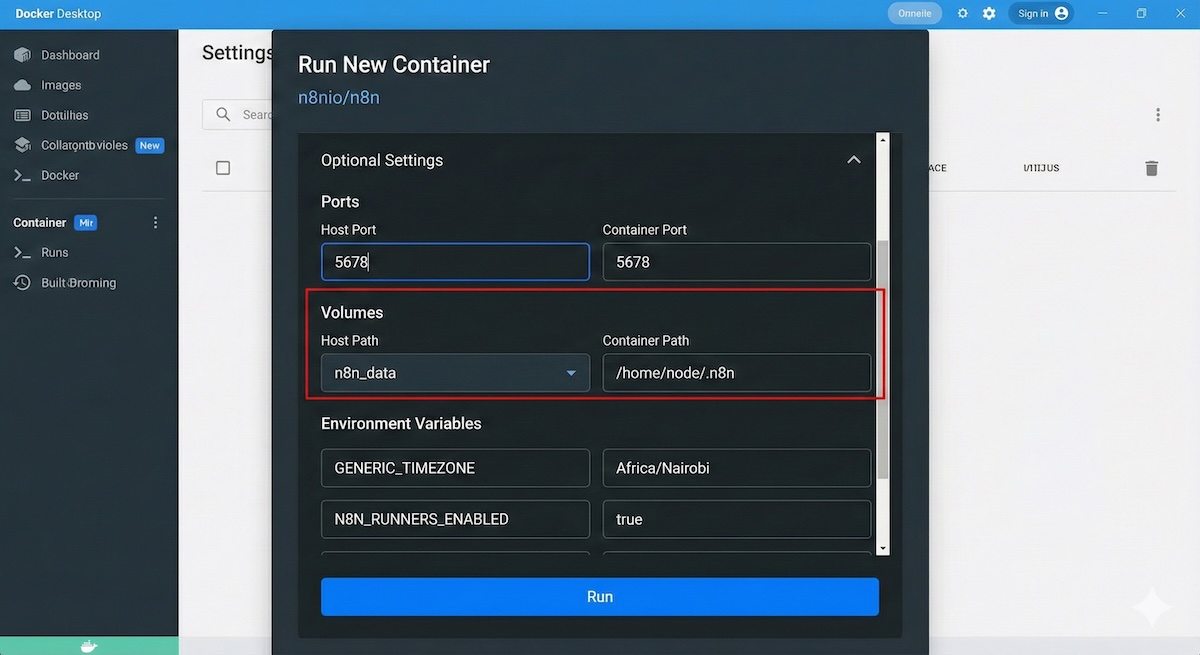
This is where you bridge the gap between the container and your host machine. Click Run on the image, but do not start it yet. Expand Optional Settings.
A. Network Bridging (Ports)
Container Port: 5678
The Physics: The container listens on port 5678 inside its virtual network. You must map port 5678 on your physical machine to forward traffic to it. Without this, localhost:5678 will refuse to connect.
B. Persistence (Volumes)
Container Path: /home/node/.n8n
The Physics: n8n is hardcoded to save data to /home/node/.n8n. By mapping this internal path to your external volume, you ensure that writing to the internal path actually writes to your persistent disk.
C. Environment Variables
You must inject configuration data into the process at startup. Add these variables:
| Variable | Value | Reason |
|---|---|---|
| GENERIC_TIMEZONE | Africa/Nairobi | Change to your TZ. Ensures Cron triggers fire at your local time, not UTC. |
| TZ | Africa/Nairobi | Change to your TZ. Sets the container OS system clock. |
| N8N_ENFORCE_SETTINGS_FILE_PERMISSIONS | true | Prevents startup crashes due to Linux user permission mismatches. |
| N8N_RUNNERS_ENABLED | true | Spawns separate processes for heavy tasks to prevent the main UI from freezing. |
For different default timezones check at https://docs.n8n.io
Step 4: Verification
2. Open your browser to http://localhost:5678
If configured correctly, you will be prompted to set up an owner account.
Troubleshooting:
- If the page fails to load → Your Port Mapping is wrong.
- If your data disappears after a restart → Your Volume Mapping is wrong.
Critical Analysis: The Limitations of Localhost
While this setup is excellent for development, you must accept the following structural limitations:
The "Invisible" Server:
Your localhost is not accessible from the public internet. External services (Stripe, GitHub, Typeform) cannot send webhooks to you. To fix this, you must use a Tunneling solution (like ngrok or Cloudflare Tunnel), or n8n's --tunnel flag (which is for testing only).
Uptime Dependency:
Automation is usually expected to run 24/7. This container only runs while your computer is on and Docker Desktop is active. Do not use this for mission-critical production workflows that must fire at 3 AM.
Database Scalability:
By default, this Docker setup uses SQLite. This is a file-based database. It is fast and simple, but it will lock up under heavy load (concurrent executions). For production usage, the architecture requires a switch to PostgreSQL, which involves a more complex Docker Compose setup.